HTML Emails from FileMaker with multiple attachments

HTML Emails from FileMaker with multiple attachments

Have you been thinking of sending HTML Emails from FileMaker with multiple attachments? Here is how you can do it…

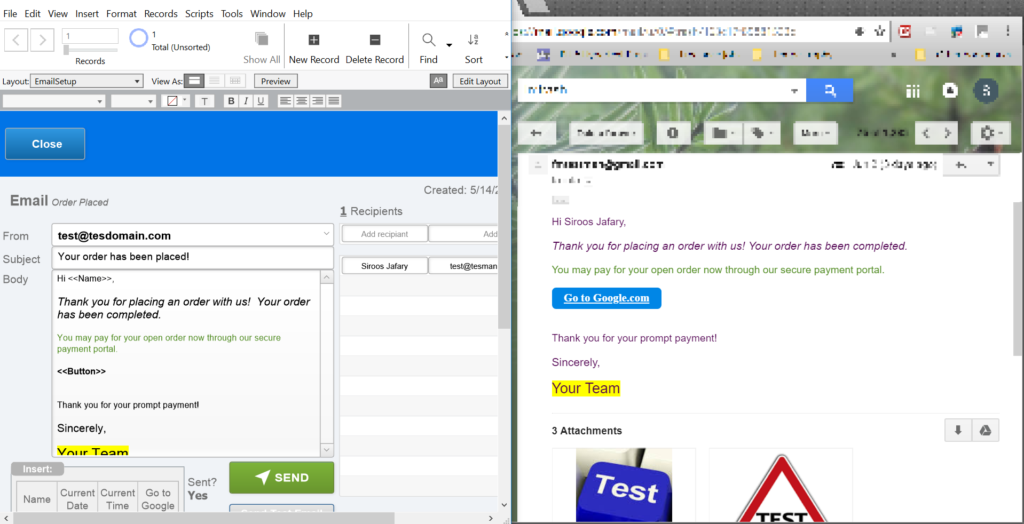
Many of us are aware of “Send Email” script step in FileMaker to send out text formatted emails. Filemaker “Send Email” script step can only attach one attachment to each email if you are on FileMaker versions 16 or older. After ages, we can now attach multiple attachments in FileMaker 17, but we are still held back with sending HTML Emails from FileMaker. HTML formatted emails are way more attractive to recipients and allow us to add incredible features like buttons with hyperlinks, embedded images in email’s body and many more…


With FileMaker HTML Emailer we can now send HTML Emails from FileMaker by employing a few custom functions a and a very well known free plugin called BaseElements from Goya.com . Base elements plugin has lots of awesome functions and it is available to us for free of charge. I would highly recommend you to subscribe to their  plugin sponsorship program . You will get access to the plugin support while helping Goya people to cover their costs and keep the plugin up in the community for free.

This file sends HTML Emails from FileMaker with following cool features:

  • Multiple recipients
  • CSS styling (Users can add any styles to email body text using FileMaker text styling bar and it will be translated to HTML inline CSS styles)
  • Supports multiple attachments (Drag and Drop)
  • Create and edit predefined email templates with support of multiple attachments
  • Both server and client compatible (Mac and Windows)
  • Template buttons to input predefined variables such as current date, recipient name, etc.
  • Add creative and cool looking buttons to email body (Hyperlinks)
  • Email sent status for each recipients
  • Send test email to any given email address to double check the email formatting


INSTALLATION

The file can easily integrate with your solution, all you need is to add it as an external source to your file and call its script from your existing solution or you can copy and paste the tables, scripts and layouts to your FileMaker file. It is a completely open file and it is available for free to you to experiment with it. You may also add more options such as “CC” or “BCC”, etc emails as you wish.

You would need to setup your SMTP server setting on:

  • Line 40 of SendEmailClientSide script
  • Line 13 of SendEmail (PSOS) script
  • Line 40 of SendTESTEmail script

#Tip: If you have access to developer tools on FileMaker advanced, then you can setup SMTP server settings as a custom function and use it in scripts.

If you decided to inject the file into your own solution, then you need to:

  1. Copy or create all existing tables of the original file into your solution and setup relationships to match its graph.
  2. Copy “Emails” script folder with all it’s scripts and paste it into your solution.
  3. Create the same layouts as the original file in your FileMaker solution and then copy and paste relevant layout objects from HTML Emailer file into them.
  4. Then set up your SMTP server configurations as explained above.


DEPENDANCIES

  • BaseElements plugin, version 3.3.7 or above
  • FileMaker 14 and above (Button bars are used in this file, if you decide to use it with older versions, you need to replace them with normal buttons but, take note that normal buttons do not accept calculations or variables as button text so, you will need to hard code them)
  • A few custom functions (please refer to manage custom functions)

Here, you can find links to custom functions used in this solution to format and send HTML Emails from FileMaker (Some are optional and some are required):

  1. Required custom function:

    This function is used to convert email text to html format.

    Above custom function translates FileMaker native text formatting into inline CSS styles.

  2. Optional custom functions:

    These Custom functions are used in SQL queries to always provide true formated field and table names. By using these, you won’t need to hard code field names and table names so, your SQL queries will never break by renaming fields or tables. (Optional)

    It is used to format numbers to currency format in HTML text. (Optional)

    To make sure that the email input is in correct format. (Optional)

    These custom functions are provided with a sample file from Goya.com to generate true system paths to be used with their plugin. (Optional)


DOWNLOAD LINK

You can download the  FileMaker HTML Emailer from here.

Username: admin

Password: admin

Hopefully you will find this article useful. Please spread the word if you think it can help other developers too!

I am open to any comment or advise to improve the file.


Thank you.


Comments

20 responses to “HTML Emails from FileMaker with multiple attachments”

  1. Şemsi Saracoğlu Avatar
    Şemsi Saracoğlu

    Thank you for this excellent file.

    1. Siroos Jafary Avatar
      Siroos Jafary

      You are more than welcome, Good luck!

  2. Santosh Singh Solanki Avatar
    Santosh Singh Solanki

    Friend Siropa Jafaru,
    I have some queries regarding your amazing application HTML Attachment Email. I have post reply of your valuable answer input new custom function. Hope you might have been go through it. Aspecting new valuable reply from your side.
    Thanks

    1. Siroos Jafary Avatar
      Siroos Jafary

      Sam,

      Sorry for late reply.

      1- The email signature image has to be served on a server. It can not be stored in a container field.

      2- To support multiple attachments, we are using BaseElments Plugin. This plugin uses true system path and not FileMaker path to attach files. The $PATH variable you used is a FileMaker path and will not work with BaseElements. You have two options to generate a true system path, either using custom functions which are provided with a sample file from Goya.com to generate true system paths or generate it using native FileMaker functions.

      If you decide to generate the path using FileMaker native functions, please read below page to understand its basics:

      Notes about File Paths – BaseElements Plugin Help Centre

  3. Philou Avatar
    Philou

    Hi there,

    I think you file is a great job and help.
    Unfortunately i am not able to make it run.
    My email provider uses the port 587 with TLS encryption.
    Any idea ?

    1. Siroos Jafary Avatar
      Siroos Jafary

      Hi Philou,

      Sorry for late reply. It was a long weekend here and I was away 😉

      Try using 465 instead of 587. It seems that using 587 would return an error (I believe error number 35). It Could be certificates error (file formats, paths, permissions), passwords, and others.

  4. Arie Husid Avatar
    Arie Husid

    Thanks for sharing this great job. It was amazing. I could make it work locally without problems, but when I tried to use it trough PSOS, occurs an number 6 error.
    I test it with Mac and Windows Server (FM Server 16).
    It happened to you? Any idea?.
    Thanks again

    1. Siroos Jafary Avatar

      Hi Arie,

      I never had that issue on servers which I tested this file on. It is a bit difficult to debug with minimum information you provided. As a shoot in a dark, I would suggest you to run a test on a FileMaker server that uses IP address instead of domain name. If that did not help, you would debug the script using BE error functions.

      Good luck!

    2. Siroos Jafary Avatar

      Hi Arie,

      Please accept my apologies for not getting back to you. Your messaged ended up in my spams folders by a mistake. The error 6 is related to FileMaker not having correct access privileges to the files. I am guessing you uploaded the file onto your server by copying and pasting it under databases folder of FileMaker server. If that is the case, please make sure that FileMaker has both read and write access to the file.

      Have you tried uploading the file to your FileMaker server using FileMaker pro?

  5. Rudy Folden Avatar
    Rudy Folden

    Hello,
    I was able to use Gmail SMTP but not on my organization’s server. I get back error 64.
    Do you know what that means?

    Also, do you know how I can set PLAIN Text authentication?

    1. Siroos Jafary Avatar

      Hi Rudy,

      Can you tell me which script step returns error 64? This error seems to be dealing with your organization email SSL certificate.

      Re, authentication question, thus is what baseelements says:

      “Authentication is controlled with curl, so options can be set with the BE_Curl_Set_Option function.”

      You can find more information on below pages:

      https://baseelementsplugin.zendesk.com/hc/en-us/articles/204528267-BE-SMTPServer?mobile_site=true

      And

      https://baseelementsplugin.zendesk.com/hc/en-us/articles/203843748-BE-Curl-Set-Option?mobile_site=true

  6. Julie Krier Avatar
    Julie Krier

    Thank you!! This post helped alot!! Still working on getting images included in the emails.

    1. Siroos Jafary Avatar

      Glad that could help! Let me know if I can help in any case.

  7. Frank Avatar
    Frank

    Siroos,

    Thank you very much for sharing an excellent demo!

    Have you considered a GMail API version, which would not require any plugins?

    See:
    https://www.seedcode.com/html-email-filemaker-gmail/
    https://dbservices.com/articles/filemaker-gmail-integration/

    I have just integrated the Seedcode demo into a CRM app and can confirm that it works very well.

    1. Siroos Jafary Avatar

      Frank,

      Thanks for sharing your smart solution. Worth to mention that since release of FileMaker 18, the “Insert From URL” script step supports protocols like HTTP(S), FTP(S), FILE, SMB, LDAP(S), and SMTP(S). Using this step, you can send out HTML emails using native FileMaker script steps.

      The solution we discussed here on this post and the solution you offered maybe still helpful to those who are still using older versions of FileMaker.

  8. Frank Avatar
    Frank

    Hi,

    It appears there is a minor bug. When sending emails with an attachment to multiple recipients, only the first recipient receives the attachment.

    1. Siroos Jafary Avatar

      Frank,

      Thanks for your feedback. Good catch!

      Once BE_SMTPSend is done it clears out the list of stored attachments regardless of the success of the Send. Therefore, we need to re-attach the attachments for every recipient. I modified the file to accommodate that.

Leave a Reply

Your email address will not be published. Required fields are marked *